A scheduled show is a promise with a page. From the studio, tap Schedule it (or GO LIVE → the Schedule chip): pick the time, and the show gets a public page fans can RSVP on, a waiting room that opens the moment you schedule it, and a door you can price. Nothing notifies anyone until you actually go live.
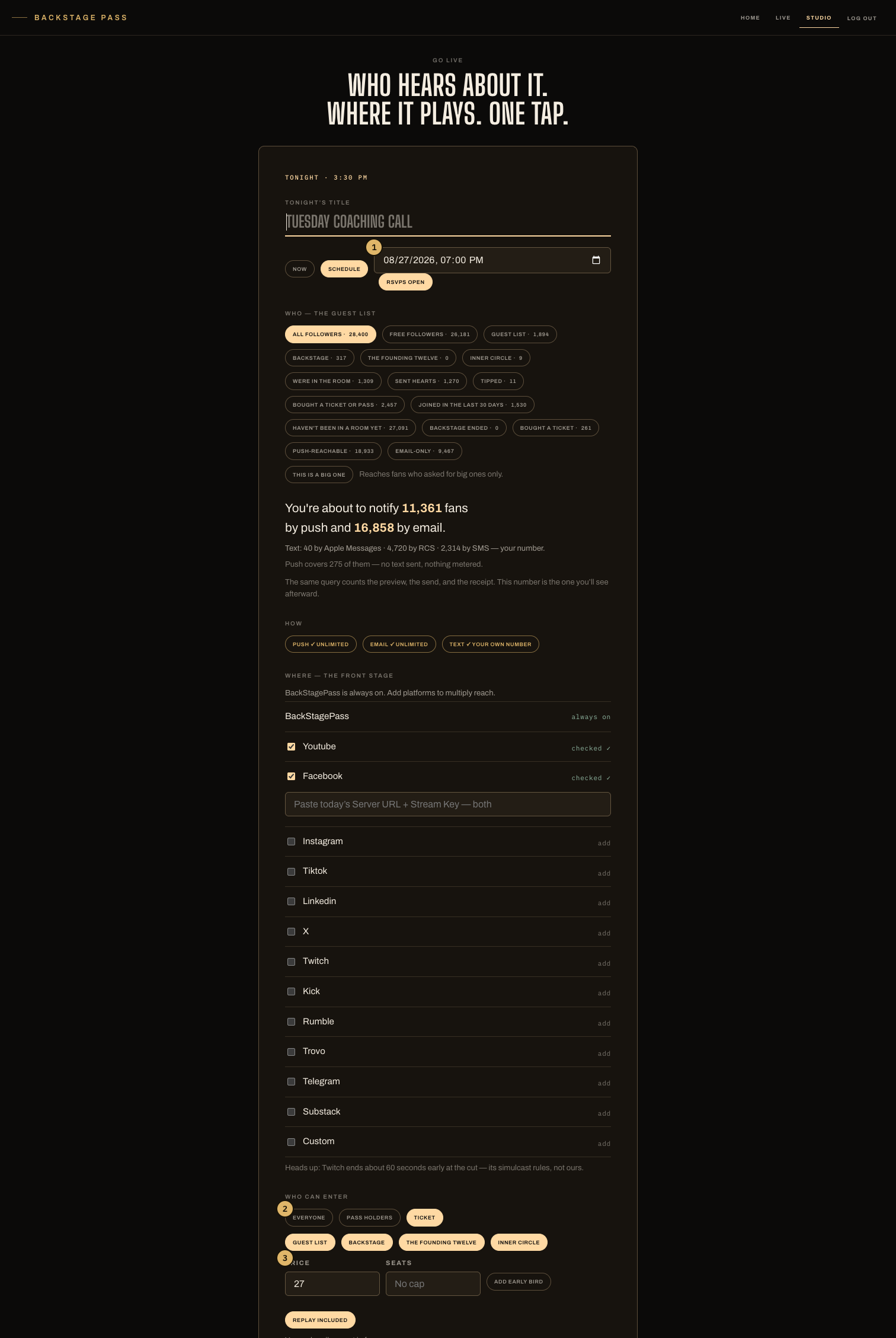
- Now or Schedule — one chip. Scheduling adds the date field and opens RSVPs.
- Who can enter: Everyone, Pass holders, or Ticket — the one access question.
- Ticket pricing: the price, optional seats, early bird, and whether the replay is included.
What fans see
The show's page is live from the moment you schedule it. Before you go live it's the waiting room: the countdown to your announced time, who's already waiting, an RSVP button and an add-to-calendar link. Its chat is closed until you open it — the switch is in your control room, beside the chat itself. An RSVP doubles as the promise — we'll push you the second the door opens. Show times print in your zone and the fan's ("8:00pm MT · 10:00pm your time").
Pricing the door
- Everyone — open room. The default.
- Pass holders — pick which of your Passes open this door. A Pass is standing in the room; subscribers walk straight in.
- Ticket — a seat for the live. The floor is $2 (under that, card fees eat the rest). Optional seats cap makes it a real house — capacity is enforced at purchase, never at the door. Early bird adds a cheaper opening phase; the active phase prices the BUY button. Encore included decides whether the ticket covers the encore too — it's printed on the ticket either way, so nobody buys a tense they didn't mean to.
Ticket holders can refund themselves in full until 24 hours before the show. Fans can also buy a seat as a gift — a paid seat that waits at the door for whoever it's for.
Promo links
From the show's control room you can mint discount links for the ticket door — a percent off, an optional use cap, an optional end date. Redemptions are counted on the link; sold tickets keep the price they were stamped with. The floor holds through every discount.
Changing your mind
Cancel this live (the ⋯ menu on the Lives board, while it's still scheduled) refunds every ticket in full, automatically, and tells everyone. A cancelled show never quietly keeps anyone's money — and on a free one, where nothing was ever charged, it says so instead of promising a refund.
Before doors
Run the Sound Check, and read the control room and the waiting room for where you and your crew wait — the short version: your control room is silent outside, and nothing notifies until you tap GO LIVE.