Not on your account yet. Stages are built and tested, and they're off while the first shows keep the control room to one thing. Everything below is what they do when they're on.
The main show keeps running; a stage opens beside it, and everyone in the room sees it appear on the stage rail. Where the cut moves the whole room backstage, a stage opens another room inside the live for the people you choose — and each one prices its own door, holds its own conversation, and files its own replay.
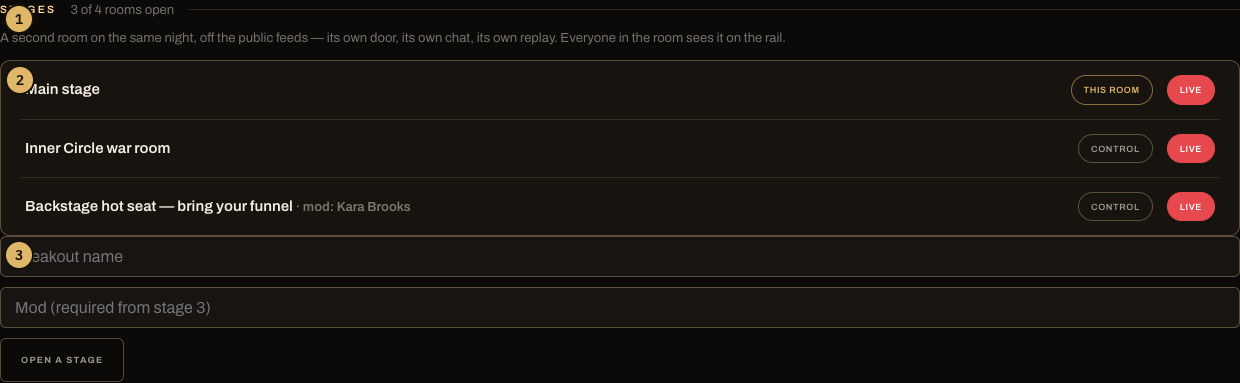
- The count: how many of this live's four rooms are open (the main plus up to three).
- The family: every room on the live, its status, and a control link for each.
- Open a stage: a name, and — from the third concurrent room — a named mod.
What stages are for
1. The After-Party — sell the room after the room. The show ends, the crowd is warm, and the receipt screen offers one tap: Open the After-Party. It opens Pass-holders-only, and your Pass holders get a push that second — the After-Party is open, [you] are backstage. Fans who aren't holders yet hit a door with the Pass on it at the exact moment they most want in. This is the single best Pass-conversion moment in the product, and it's one tap.
2. The backstage room, mid-show. Keep the main stage rolling to everyone — simulcast and all — and open a breakout behind a Pass or ticket door. The public watches the show; the inner room gets the smaller, closer version: the Q&A after the pitch, the members-only debrief, the huddle. A breakout inherits the main show's door by default, so a members-only main opens members-only side rooms without re-configuring anything.
3. Parallel tracks. Split a workshop into up to three side rooms beside the main — topic tables, cohorts, office hours. Each room has its own chat, so conversations don't shout over each other, and each files its own replay, so the live's archive keeps every track separately.
Whatever the use, the payoff is the same three things: a door (each stage prices itself), a chat (each room its own conversation), and a replay (each room on the record under the live — fans find them nested on the main replay as “the night's rooms”).
The rules the board enforces
- Four rooms, total. The main plus three concurrent stages — the hard cap. The board refuses a fifth.
- A named mod from the third room. You can't watch four chats at once; from the third concurrent room, the form requires a mod's name before the door opens.
- Breakouts never simulcast. A stage is BackstagePass-native by design — a second room off the public feeds is the point. The main show is the one that plays the front stage.
- Stages hang off the main. One level deep, never a breakout under a breakout.
- One After-Party per show. A second tap re-enters the one that exists rather than opening a twin.
How fans move between rooms
The stage rail sits at the top of every room view — the main stage plus every open sibling, each badged by its own door: your room, a price, or closed. One tap moves a fan between rooms; a locked door shows the way to buy. Nobody has to hunt for the second room, and nobody enters one their pass doesn't cover.
Opening one
Live, on the main show's control room: name the breakout, name a mod if it's the third room, tap Open a stage. The After-Party has its own tap on the receipt at END. Every stage gets its own control room, linked from the family list.