Following is free and does one thing: you're told the second they're live. Everything about how you're told belongs to you, at Settings → Notifications — and your rules beat our defaults, every time. No creator can see or change a single dial on this page.
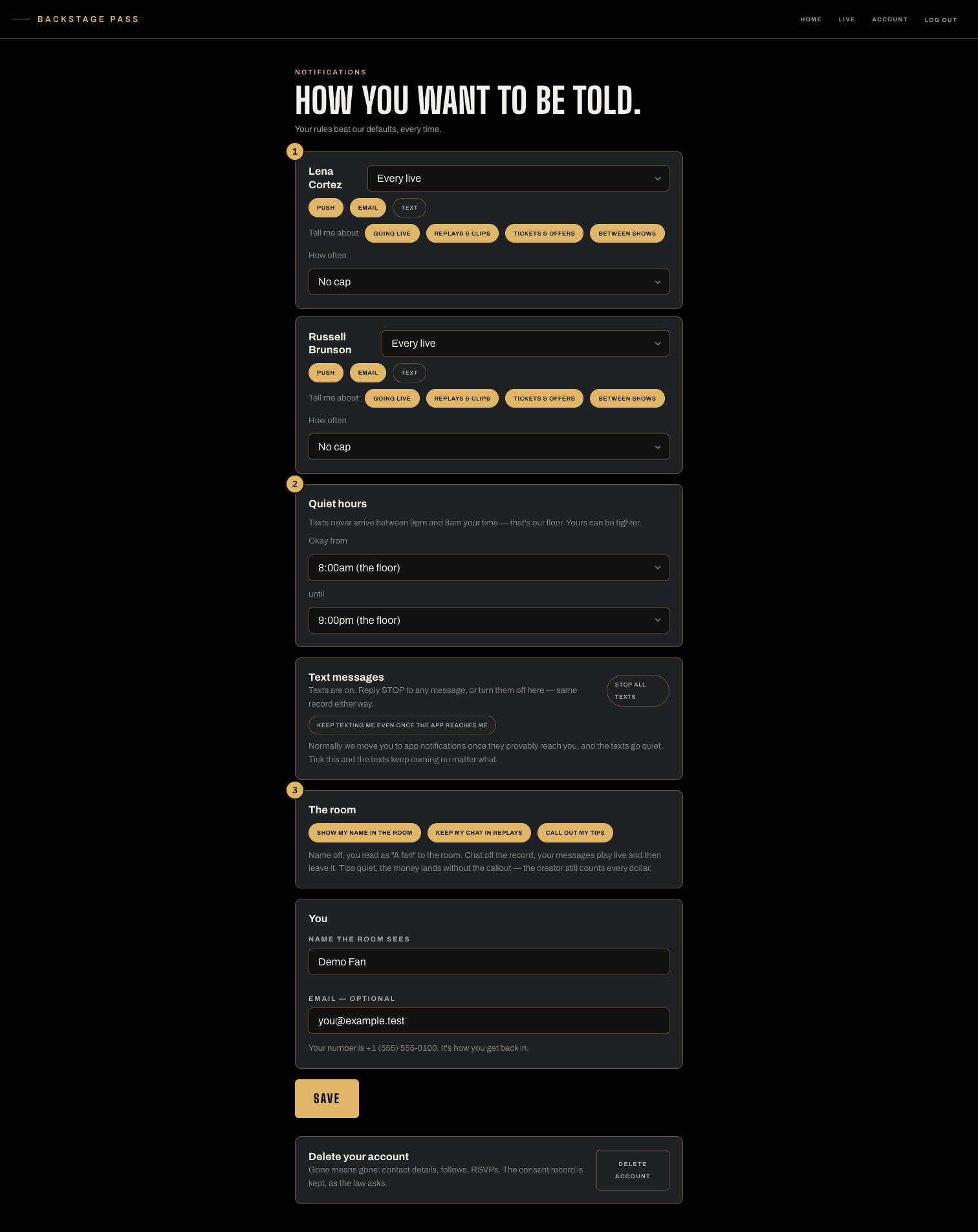
- Per creator: which channels (push, email, text), what about (going live, replays, offers, between shows), and how often.
- The room card: your name, your chat in replays, your tips — three dials, plainly stated.
Per creator, per channel
Each creator you follow gets their own card: push, email, text — each its own switch — plus a signal tier (Every live, Big ones only, or a Daily digest) and what you want to hear about at all: going live, replays and clips, tickets and offers, between-show messages. A frequency cap (one, three, or five a week) holds no matter what any creator sends; what it holds shows up on their receipt as a count, never as your name.
Quiet hours
Texts never arrive between 9pm and 8am your time — that's the floor, for everyone, always, and it is the sending machinery that enforces it. A text that lands in your quiet window is held until morning, and the creator's receipt says “held,” honestly. The per-person window that narrows that floor isn't on this page right now: it only ever governed texts, and we'd rather show you nothing than a switch that doesn't reach the notifications you actually get.
Texts
No creator can text you without your consent — the sending machinery itself refuses, so this is structure, not policy. Reply STOP to any text and it sticks; the “stop all texts” switch here is the same record. And if you prefer texts: normally we move you to push notifications once they provably reach you and the texts go quiet — tick keep texting me and they keep coming no matter what.
Push on this device
Push is the rail with no carrier and no toll — turn it on and going live lands the second it happens. The switch is on this page, per device. On iPhone's browser, add BackstagePass to your Home Screen first; then the switch appears.
The room, on your terms
- Name off — you read as “A fan” to the room and the creator both.
- Chat off the record — your messages play live, then leave it; replays won't carry them.
- Tips quiet — the money lands without the callout. The creator still counts every dollar.
Unfollowing one creator
On a creator's page, the Following button opens onto two things: how you want to be told, and Unfollow. Unfollow confirms once and that's it — you stop being told when they go live, and you can follow again any time. Nothing is dressed up as something else on the way out, and nothing else you follow is touched.
Leaving entirely
Delete account is on this page, and gone means gone: contact details, follows, RSVPs. Active renewals are canceled with the biller first, and the consent record is kept, as the law asks. For stopping messages without leaving, see Unsubscribing.